Experiment
In daily use
Voice to Notion
A journal I never type, built from voice, with a dashboard that knows a real zero-spend day from a day I forgot to log.
- Role
- Design + build, solo
- Apparatus
- Claude · Claude Code · Notion · Wispr Flow
- Tags
The problem
Journaling never stuck for me, for the same two reasons every time. A blank page at 11pm after a full day is a tax, and it is a tax that competes with sleep — the habit dies in week two, always. The systems that do survive survive because they are easy, and they are easy because they are shallow — a mood slider, a habit checkbox, one line. That stuff is trivially loggable and almost worthless later. I do not care that a Tuesday was a four out of five. I care what I was working through, what I decided and why, and what I could not stop turning over in my head.
So the real requirement was awkward. Capture had to be effortless, and the output had to be deep — two things that normally pull in opposite directions, because low friction pushes you toward short structured input and depth needs long unstructured input. Speech resolves it. Talking for three minutes is easier than typing for one, and it carries far more than any form would. The missing piece was never capture. It was a writer sitting between my mouth and the database.
What I wanted
Five things, decided before anything was built.
- Speak, never type. Voice dictation on phone and laptop, in whatever shape it comes out — run-on sentences, filler words, repetition, transcription errors. The system cleans up delivery and leaves substance alone.
- One page per date, forever. Never two pages for the same day, never a duplicate when I log twice, never an overwrite when I add something at midnight.
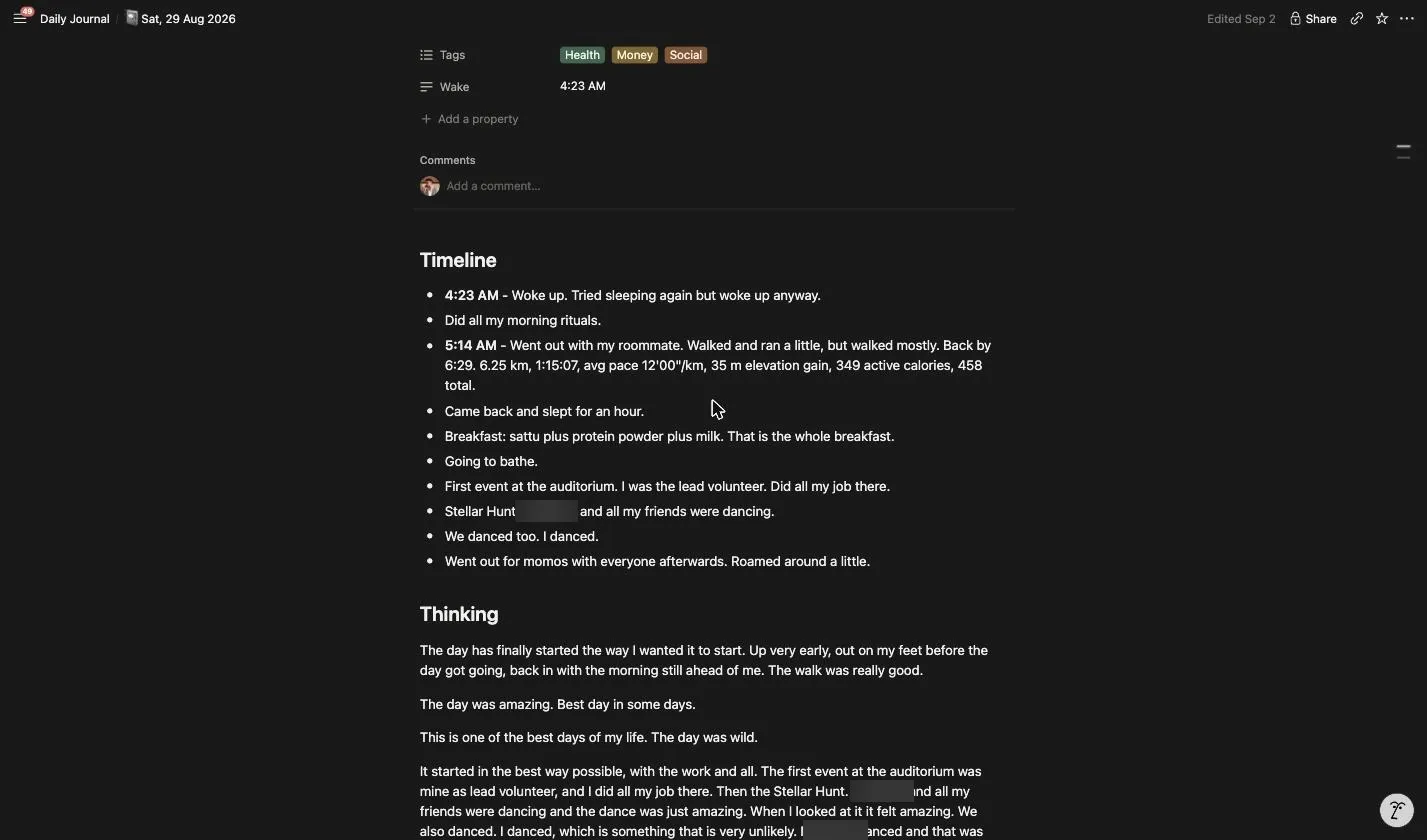
- Depth preserved at full length. If I talk for three minutes about something, that becomes several paragraphs, not one bullet. A thin day is allowed to look thin. A dense day must not be flattened.
- Money handled separately, without saying it twice. When I mention spending in passing, the number goes to the expense tracker and the thought stays in the journal.
- No conversation. One line of confirmation. No summary of what I just said, no follow-up questions, no encouragement.
What it is now
Three parts, and the interesting design work is in how they divide labour rather than in any one of them.
The scribe. A Claude Project whose instruction set is the actual product — page structure, fidelity rules, voice, date logic, and the routing rule that splits money from meaning.
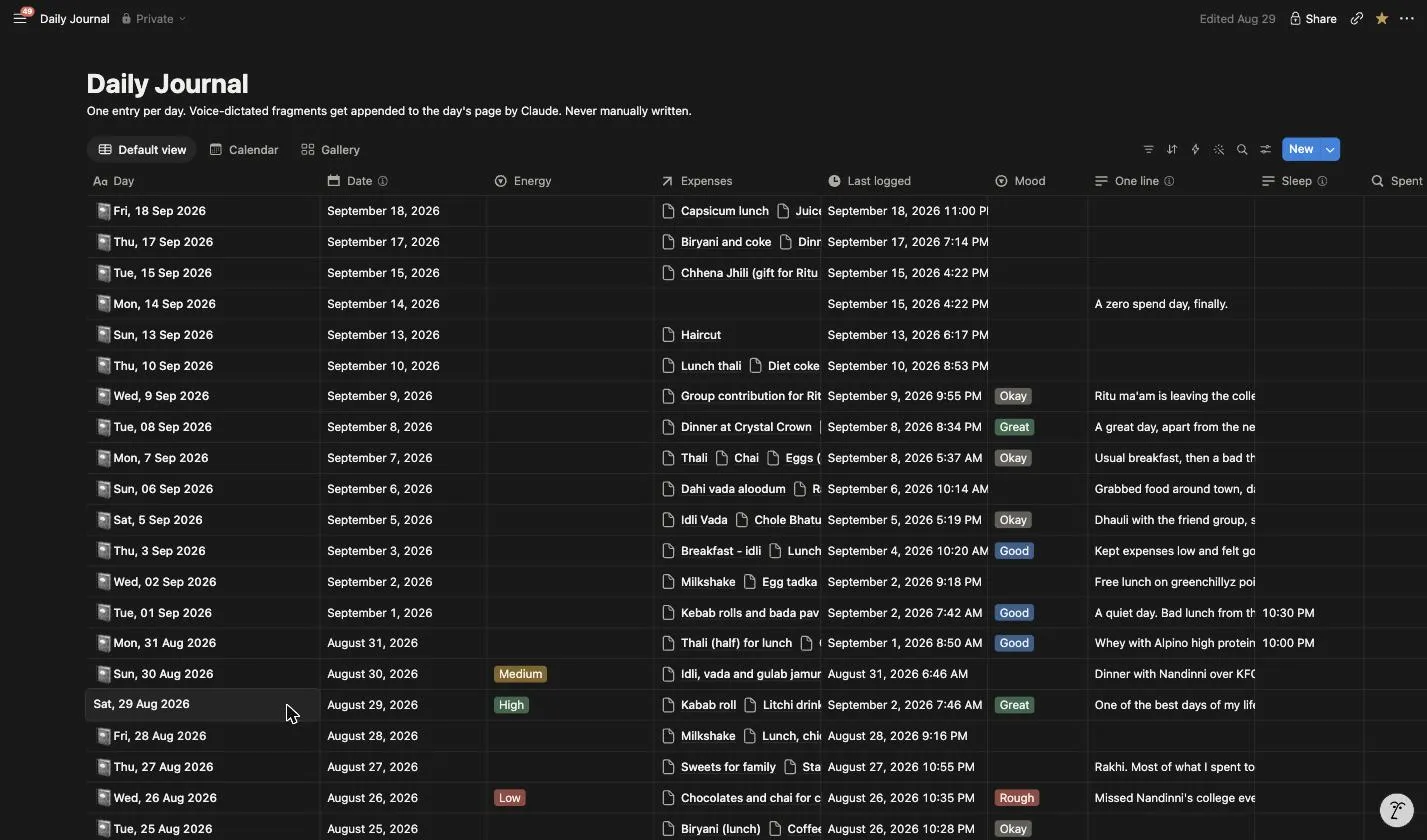
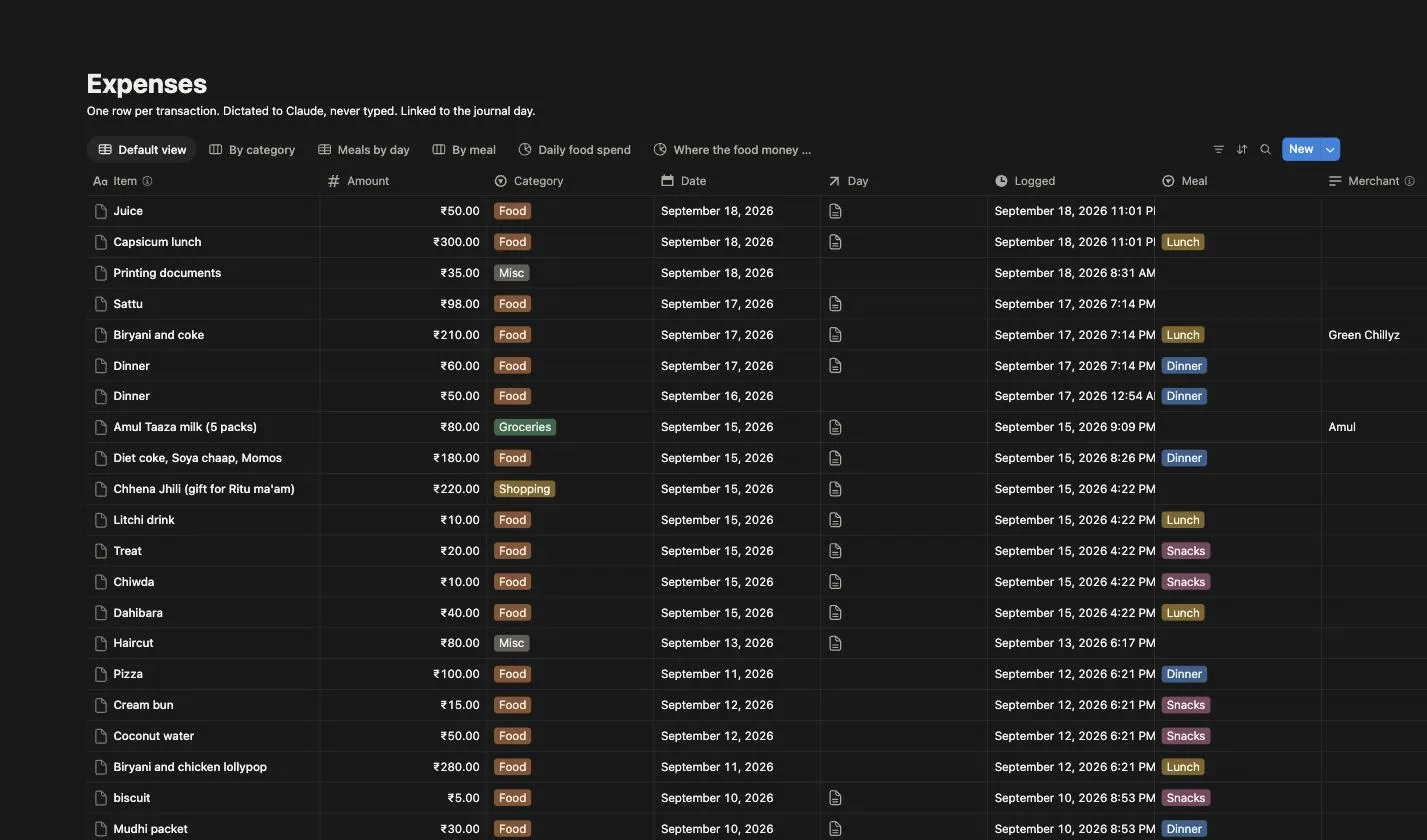
The databases. Two Notion databases with a relation between them. Daily Journal is one page per calendar date. Expenses is one row per transaction, with a relation pointing back at that date’s journal page.
Expense Pulse. A live dashboard that queries both databases and re-renders every thirty seconds.
How a fragment travels
I dictate into the chat. The scribe works out which date the fragment belongs to — today in IST by default, but “yesterday” or “on Friday” override it, and anything dictated after midnight about the evening that just ended belongs to the previous date. This is the single most load-bearing rule in the system, because I almost always log for the day before.
It queries the journal database on the date before writing anything. If a page exists, the fragment is merged in. If not, one is created. One page per date is enforced at this step rather than hoped for.
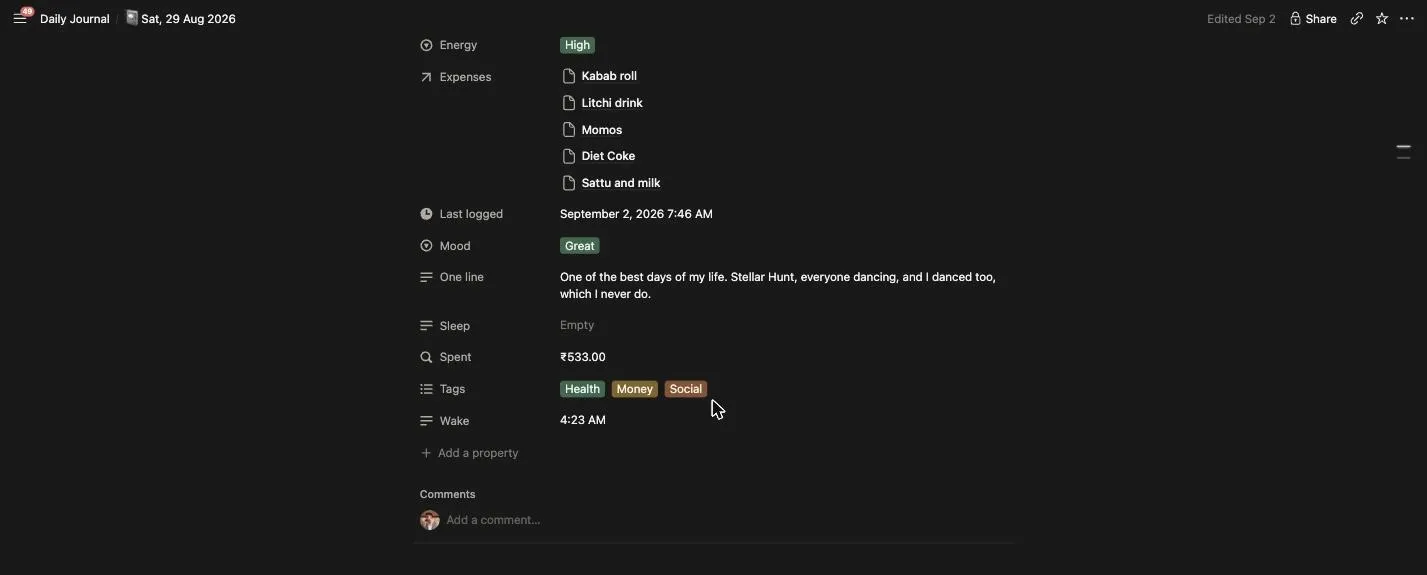
Properties get filled in quietly — mood is inferred from tone rather than asked, and a one-line summary gets rewritten as the day fills up. If a rupee amount attached to a purchase appears anywhere in what I said, a row is created in Expenses with an inferred category, related back to that date’s page.
Then one rule handles the journal side, and I think it is the best decision in the whole system: the amount never enters the journal. A bare transaction, stated with no thought attached, is not a journal entry — nothing is written. A spend wrapped in a thought keeps the thought in full, with the number stripped out. The money goes where money goes. The thought goes where thoughts go.
Finally I get one line back. That is the entire interface. A month of this now: 29 entries across the 33 days since, no duplicate dates — the one requirement I cared most about, still holding.
The rules that make it work
Do not invent. Do not compress. Keep my phrasing. That is most of the instruction set.
Most of the build time went on rules precise enough that an assistant would not quietly improve my journal into something that was not mine.
- Do not invent. No events I did not describe, no emotions I did not express, no tidy conclusion I did not reach. If I left something unresolved, it stays unresolved on the page.
- Do not compress. The failure mode I care about most, because compression is the default behaviour of every assistant, and it destroys exactly the part of a journal that has value later.
- Keep my phrasing. When I say something in a way that is distinctly mine, it stays as I said it. No smoothing into neutral prose.
- Preserve the shape of the thought. If I contradicted myself mid-thought, that contradiction is data and it stays.
- Voice. First person, as me. Plain and restrained. No motivational register, no AI-essay cadence — an assistant left to its own devices writes journal entries that sound like LinkedIn posts, and reading those back in ten years would be worse than having no journal at all.
This is what it looks like when it holds. A friend’s name is blurred; nothing else is.
The dashboard, and the one idea inside it
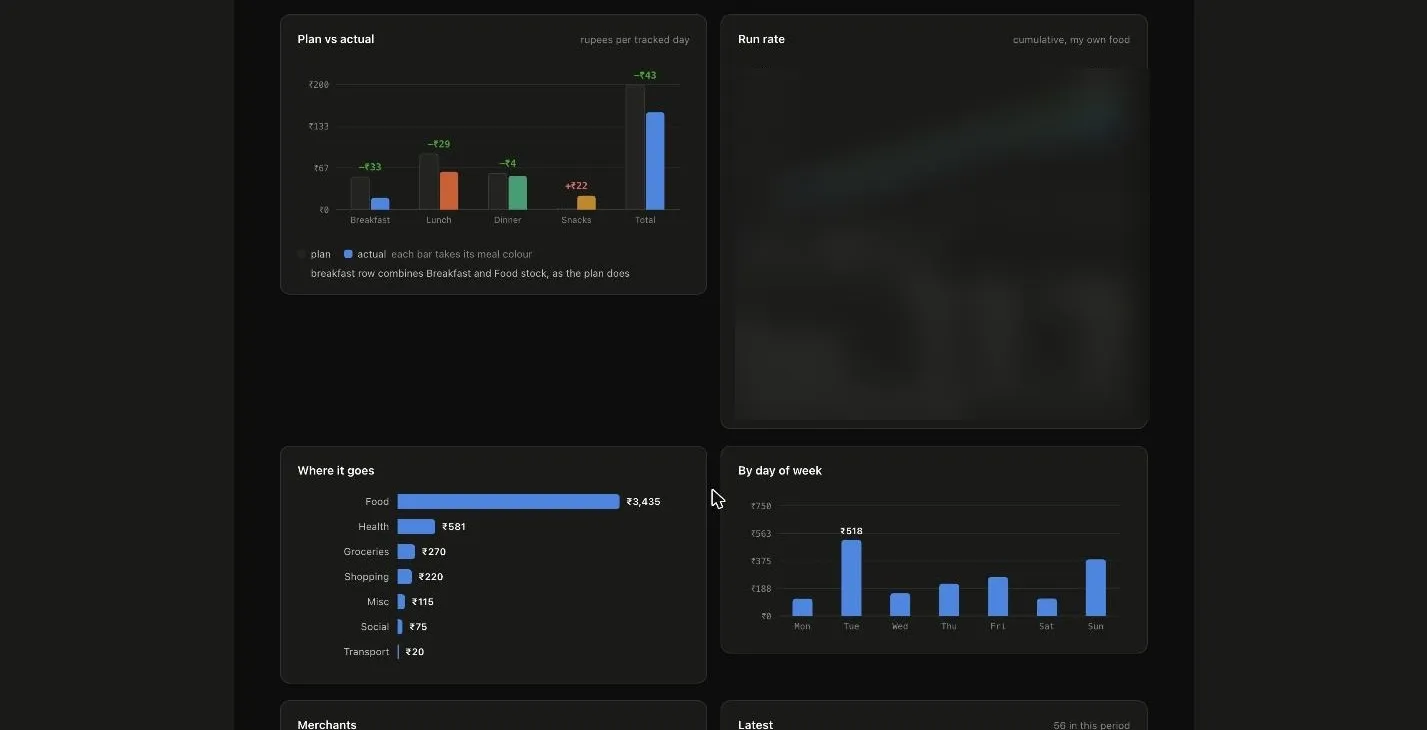
Expense Pulse queries the Expenses database live: spend for the month, a daily chart, a meal breakdown, plan against actual, a run rate against budget, categories, merchants, a live feed. The exact monthly total and my budget are blurred below — the shape of the dashboard is the point, not my rupee figure.
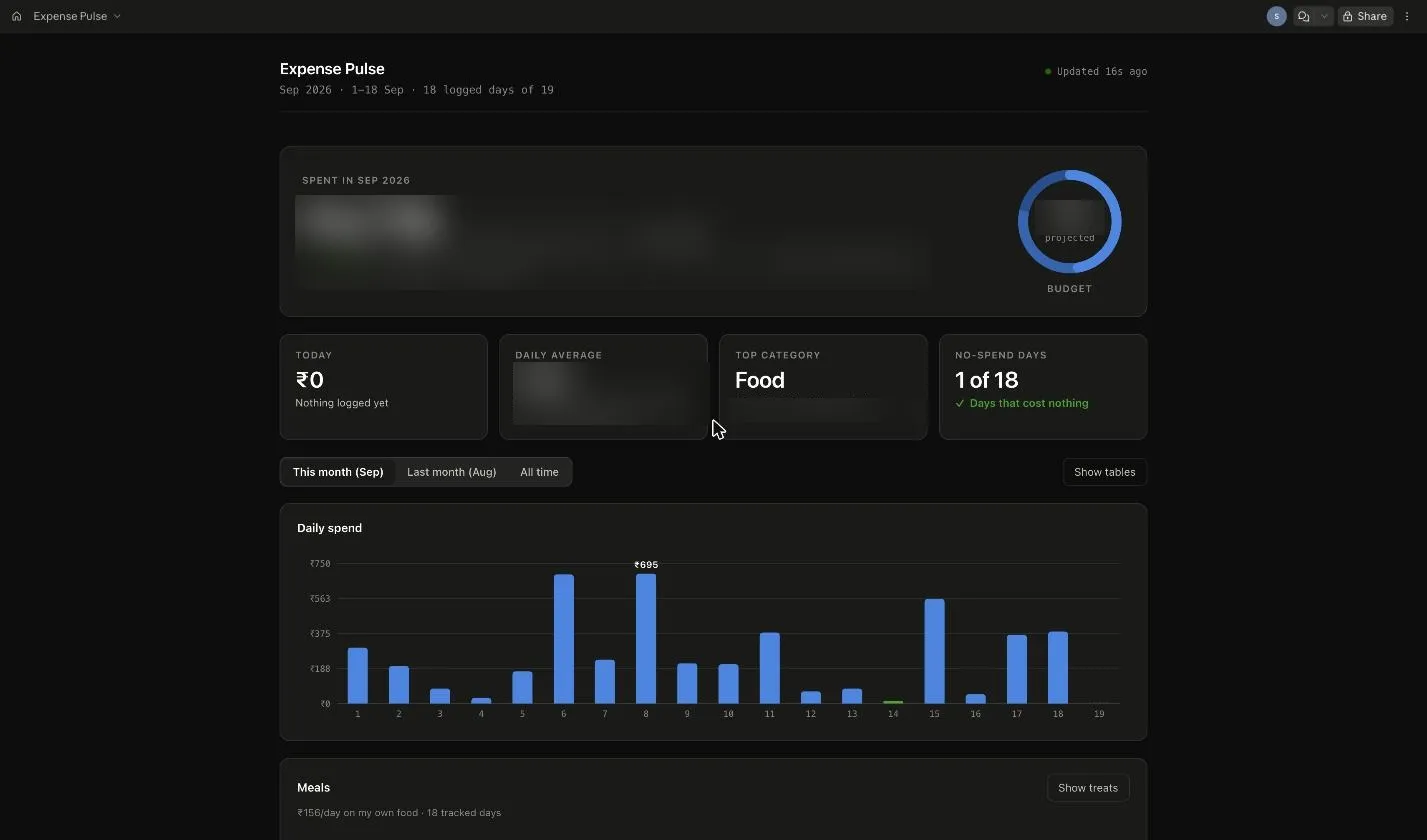
The one idea worth stealing from it is how it counts days. A naive tracker divides total spend by the number of days in the month, which is wrong in both directions — days that have not happened yet count as spending nothing, and a day you forgot to log looks identical to a day you genuinely spent nothing. Both drag the average down, flattering you exactly when your logging is worst.
So every date gets classified into one of three states. Spent means an expense row exists. Zero means no expense row, but a journal page exists for that date — proof the day was logged and really did cost nothing. Unknown means neither, so the day is excluded from every average. In the daily chart above, day 14 is a thin green line — a real zero, proven by the journal — and day 19 is simply missing, because neither a row nor a page exists for it yet.
The journal is what makes that distinction possible. A separate database, built for a completely different purpose, turns out to be the witness that tells a real zero-spend day apart from a day that was never logged. That is the payoff of the two-database design, and I did not see it coming when I built it.
The same idea runs through the rest of the page. Meals are split out so a stock-up trip and an actual sitting never get counted as the same thing.
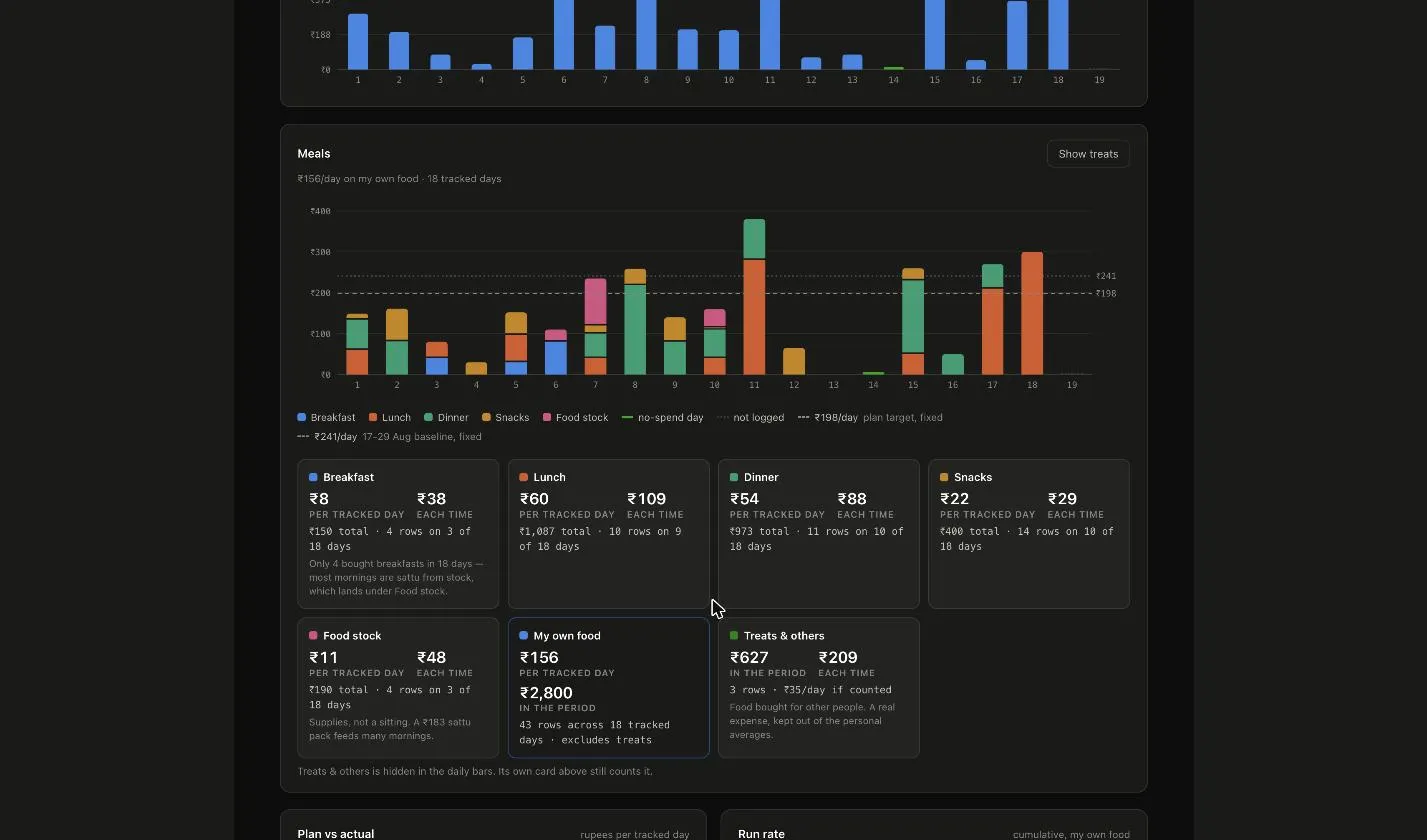
Plan against actual and a run rate against budget sit alongside it, for the same reason a bank statement isn’t enough on its own — a total tells you what happened, a rate tells you where you are heading.
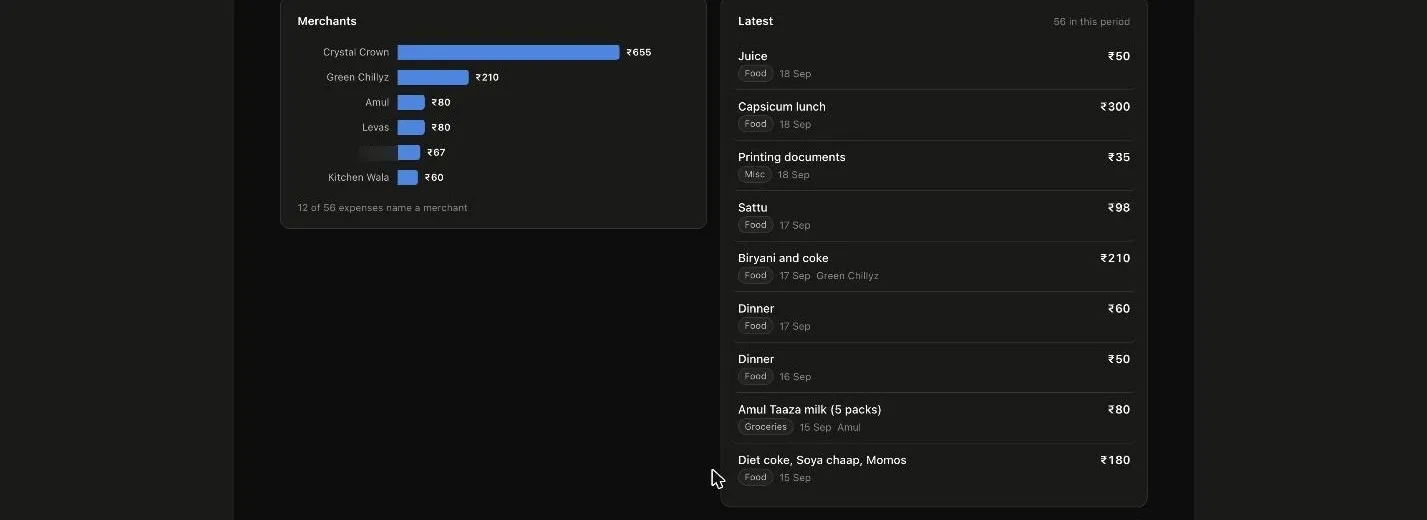
And a merchants list with a live feed of the latest rows, useful mostly for catching a typo before it skews a category for the month.
How it was built
In one sitting, roughly thirty to forty minutes, and not with one tool but three, each doing a different job. That number is the point, so it is worth being precise about what it means — it was not thirty minutes of typing code, because most of the work was not code at all.
Notion holds the two databases: properties, select options, one relation, a rollup. Fifteen minutes of decisions, no implementation. Claude runs the scribe — a Project with a fixed instruction set, which is a prompt, not a program. There is no application, no server, no webhook; it reads and writes Notion directly through the connector. Claude Code built the one part of this that is actually a program: Expense Pulse, the dashboard, is a self-contained HTML file with hand-drawn SVG charts and no build step.
So the real build was: decide the schema in Notion, write the scribe’s instructions carefully, then let Claude Code produce the dashboard against a database that already had real rows in it. The part that took thought was the instruction set, and every rule in it exists because of a specific failure I could imagine — a compressed thought, a duplicate page, an invented conclusion, a date silently off by one.
What’s still wrong
Being honest about this is more useful than a clean results section.
- Title formatting drifted. Entry titles should read consistently, but the day number is sometimes zero-padded and sometimes not. The date property underneath is correct in every case, so nothing downstream broke — the format rule was just not tight enough.
- Property fill-in decayed. The earliest entries have mood, energy and tags. The most recent often do not, because the rule says to fill properties only from what the fragment reveals, and my recent dictations have been shorter. The metadata layer degrades quietly while the body of the journal stays fine.
- Seven of 112 expense rows are not linked to a journal day — logged before that day’s page existed, so the relation had nothing to point at. They still count toward spend but cannot be classified as tracked days.
- There is no delete tool in the connector, so correcting a wrongly created page means clearing its content, then trashing the shell by hand.
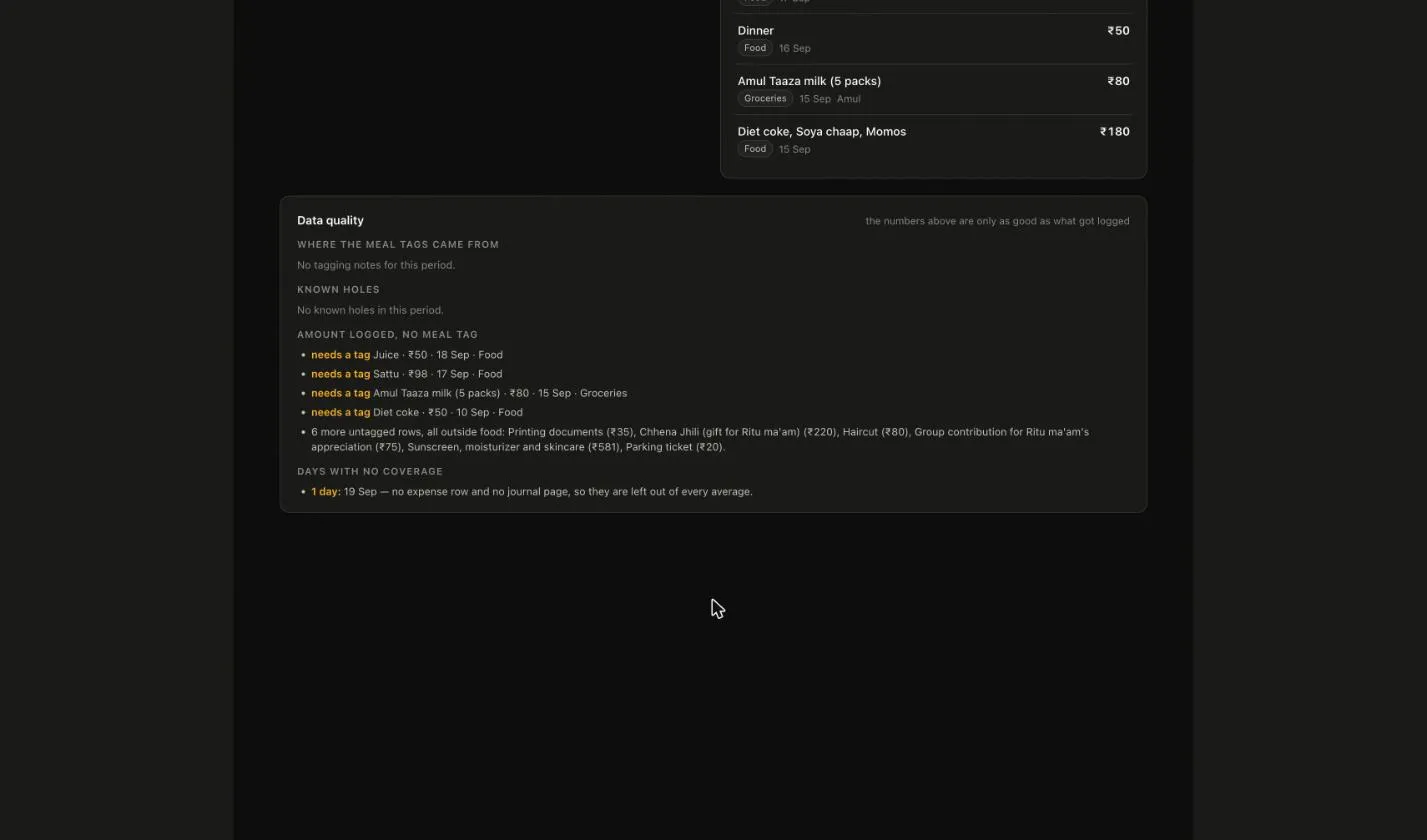
And the whole system depends on me talking to it. A day I do not mention is a day that does not exist, and the dashboard is careful to say so rather than pretend it was a zero.
Stack
Notion for storage, two databases with a relation, accessed through the Notion MCP connector. Claude as the scribe, configured as a Project with a fixed instruction set. Wispr Flow for voice dictation across phone and laptop. Claude Code for Expense Pulse, the dashboard — the one piece of this that is actually a program.
No server. No database of my own. No deploy pipeline. Nothing to maintain.
What happened
- 2 weeks → 33 days how long the habit has lasted. Every attempt I made by hand died by week two — this one hasn't stopped.
- Selectors → 90 sec to log a whole day now. No template, no mood picker — I talk, and I am done.
- 1 bullet → paragraphs what three minutes of talking becomes now, instead of the one-line summary every past attempt settled for.
- 2 states → 3 spent, zero or unknown, so a day I forgot is never averaged in as a day I saved.
- 30–40 min to build across three tools — Notion for the databases, Claude for the scribe, Claude Code for the dashboard.
The honest note
Almost none of the build time went on plumbing. It went on writing rules precise enough that an assistant would not quietly improve my journal into something that was not mine — do not invent, do not compress, keep my phrasing, preserve the shape of the thought even when it contradicts itself.
It is private, so there is no link to try. What is blurred in the screenshots below is a friend's name and my exact monthly numbers — everything else is the real thing, unedited.
Not built yet
- Tighten the entry-title date format to one rule with no room for interpretation, and backfill the drift.
- A weekly pass that reads the last seven days back to me and asks about the open loops I never closed.
- Close the loop on money so a rupee amount mentioned in the journal cannot fail to become an expense row.
- Make the dashboard read the journal text itself, not just check that a page exists — right now it is only a yes-or-no witness for coverage.